


YouVersion Bible App + Audio
4.9597.03K Reviews
App Specs
- Version
- 11.34.1+7098322
- Updated On
- License
- Free
- Downloads
- 100,000,000+
- Developer
- Life.Church
- Categories
- Books & Reference
- Platform
- Android, iOS
Screenshots
 Analysis by AppCompare
When I open YouVersion Bible App + Audio for the first time, I would not try to explore every menu at once. The useful starting point is simpler: choose a passage or a reading plan, spend a few minutes with it, and decide whether the app’s mix of text, audio, and guided reading fits the way I actually make time for the Bible. That small first session is more revealing than browsing a long list of options.
What to expect from a Bible app built for daily use
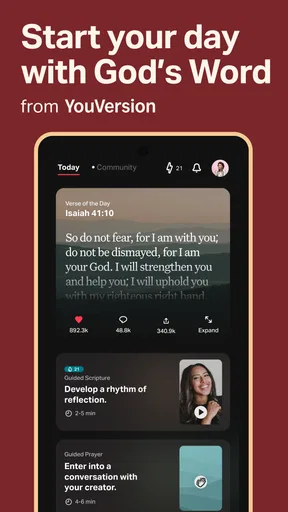
YouVersion is a free Books & Reference app from Life.Church, and its scale is hard to miss: it has more than 100 million installs and a 4.9 average from around 8.6 million ratings. Those figures suggest broad appeal, but they do not tell me whether it suits a particular reader. What matters in practice is that the app brings Bible reading, audio, plans, and social tools into one place rather than treating a digital Bible as only a searchable book.
That combination is especially useful if your routine changes from day to day. I might read quietly at breakfast, listen while walking, or open a short passage during a break. The app can support those different habits without requiring me to choose one fixed format. It is rated for Teen audiences, and its current version is 11.14.7+7085925.
Guides and Analysis on YouVersion Bible App + Audio
A reassuring first setup
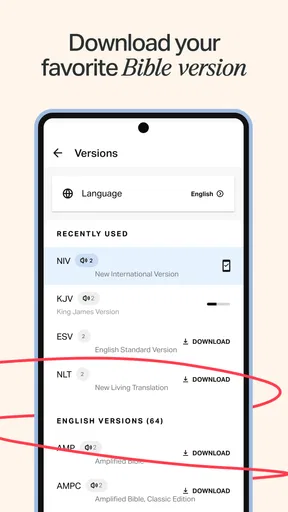
On a first visit, I would begin by picking a translation I can comfortably read, then use search to locate a passage I already know or a topic I want to explore. This avoids the familiar first-day trap of spending twenty minutes adjusting settings and leaving without reading anything. If I am unsure where to begin, a plan offers a more guided route; if I already have a goal, direct search is quicker.
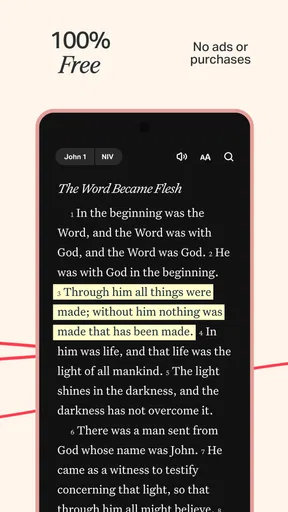
One practical choice is to make the reading experience comfortable before setting a daily target. The original review notes adjustable text size and background colors, plus a night mode. I would test those during the first session, especially if I tend to read on a small screen or in a dim room. A display that feels easy on the eyes is more likely to bring me back than an ambitious reminder schedule.
The first meaningful success: finish one short reading
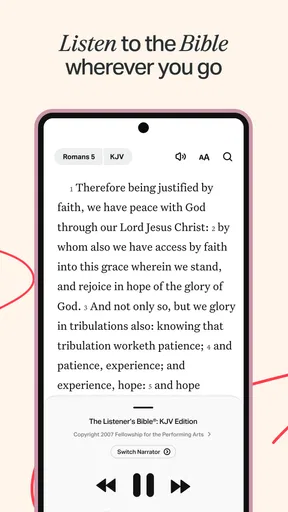
For a realistic first use, I would open a short passage, read it once without rushing, and then try the audio version if listening suits me better. That is a complete first session: I have found a text, spent time with it, and learned whether reading or listening feels more natural. Audio can be handy on a walk or during a commute, but I would keep my attention on the road and use it only when listening is safe.
A small but useful workflow is to save offline audio before relying on it somewhere with a weak connection. The app’s offline listening can make a planned walk or a stretch of travel more dependable, but downloading ahead is the sensible step; I would not wait until I had already lost connectivity. For quiet study, text may be better because it is easier to pause, reread a sentence, or compare wording at my own pace.
Worth Reading Before You Choose

Switching to Android Auto Means Rethinking Your Driving Routine

Google Calendar Makes a Crowded Week Easier to Manage

Ludo King Makes the Most of the Minutes Between Plans

Baby Panda World Brings Quick Play to Modern Phones, but Its Game Library Feels Busy

ESPN’s Live Game View Makes Following Close Games Easier

QuizzLand Review: A Good Fit for Short Trivia Breaks, Not Every Player
How it compares with simpler alternatives
Compared with a basic ebook-style Bible app, YouVersion is more of an everyday reading hub: audio, plans, reminders, verse sharing, and group features are part of the experience. That breadth is a real advantage for someone who wants one app for several habits. The trade-off is that a reader who only wants a clean page of scripture may find the additional paths distracting. In that case, a simpler Bible reader—or a printed Bible—can make it easier to focus.
It also differs from a dedicated study reference. Search is useful for finding a verse or topic, but a search result is only a starting point, not a substitute for reading the surrounding passage or consulting a study resource when interpretation matters. I would use YouVersion for regular reading and listening, then turn to a trusted commentary or other reference when I need deeper historical or theological context.
Features That Stand Out
First off, the sheer variety of translations available is mind-blowing. We're talking over 2,000 versions in more than 1,300 languages. Whether you're into the classic King James Version or a more contemporary New Living Translation, the YouVersion Bible App has got you covered. The search feature is also top-notch, allowing you to find specific verses or topics in a flash.
What really sets this app apart is the audio feature. Sometimes I just pop in my earbuds and listen to a soothing voice read the scriptures to me while I'm on my morning jog or stuck in traffic. It's like having a personal Bible study session on the go. Plus, you can download the audio for offline listening, which is a lifesaver when you're off the grid.
Interactive Community and Plans
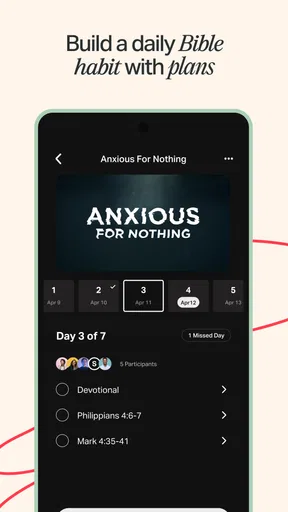
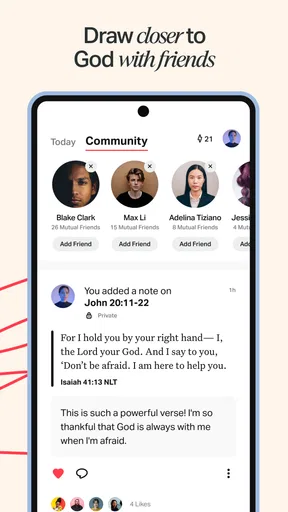
The community aspect is another feature I love. You can connect with friends, share verses, and even set up Bible study groups. It's like social media but with a spiritual twist. The app also offers a variety of reading plans covering different themes and topics. Whether you're looking to deepen your faith or explore a specific book of the Bible, there's a plan tailored just for you.
Notifications keep you on track, gently nudging you to stay consistent with your reading goals. It's these little reminders that have helped me maintain my daily devotional habit.
User-Friendly Design
As someone who values a smooth user experience, I was impressed by the app's interface. It's intuitive and easy to navigate, even if you're not tech-savvy. You can customize your reading experience too, tweaking font sizes and background colors to suit your preferences. Night mode is a neat feature for those late-night reading sessions.
Another cool touch is the ability to create verse images. I love sharing these with friends or on social media, adding a personal touch to my daily inspirations.
Common friction, and how I would handle it
The main risk for a new user is choice overload. Many translations, plans, audio options, and social features can turn a simple reading session into a tour of the app. I would resist signing up for several plans or turning on every reminder at once. Pick one plan, or none, and one realistic time of day; if the habit feels manageable after a week, then consider adding another layer.
Plans are helpful when I want structure, but they are not automatically the best way to read. A plan can keep me moving through a theme or book, while open reading gives me room to follow a question that came up that day. If I miss a day, I would simply continue when I return rather than treating the schedule as a test I have failed. The goal is a useful reading rhythm, not an unbroken streak.
Search deserves a little care too. Searching a familiar phrase can quickly surface relevant passages, but a keyword match does not explain the passage’s setting or argument. My better workflow is to open the result in context and read the paragraphs around it. That habit prevents the convenience of search from encouraging a verse to be treated as a complete answer on its own.
Making audio and sharing work for you
Audio is not just a substitute for reading; it can help when my eyes are tired or my hands are occupied. I would use it for a walk, household chores, or a quiet commute as a listener, then return to the text later if I want to mark a detail or compare how a sentence reads. The trade-off is that listening makes it easier to drift mentally, so a short passage and a deliberate pause can be more useful than letting a long session play in the background.
Offline listening is most valuable when planned. Before leaving home, I would check that the audio I want is downloaded rather than assume a passage will be available without a connection. This is a small preparation step, but it matters on a trip or in a place where reception is unreliable. For a reader who rarely listens away from home, the feature may matter less than the text and search tools.
Verse images and sharing can turn a private reading into a conversation, but I would treat that as optional rather than the point of the session. A verse image is a convenient way to pass along a line that stayed with me; it is not a replacement for discussing what the passage means. Likewise, community features can help friends read together, but anyone who prefers a private, distraction-free routine can simply leave those social options aside.
Who will benefit most—and who may prefer another approach
I think the app is a strong fit for someone who wants a free, flexible way to read or listen in short windows throughout the day, especially a beginner who would appreciate plans as a starting guide. It also suits people who read in more than one language, share verses with friends, or want a group routine alongside individual reading. The app’s range is useful when a household or group has different preferences, though each person still needs to choose a translation that works for them.
It may be less suitable for someone who wants a deliberately minimal screen, dislikes reminders or community elements, or expects a dedicated academic study library. In those cases, I would choose a simpler text-focused reader, a printed edition, or a specialist reference tool for the task at hand. YouVersion’s breadth is its strength, but breadth is not the same as depth in every area.
For a first-time user, I would keep the first week uncomplicated: read a little at a regular moment, try audio once, and decide whether a plan adds helpful structure. If a notification feels like pressure, adjust the routine rather than forcing it. If I am using the app with friends, I would agree on one manageable reading and a time to discuss it, instead of assuming that the social tools alone will create a meaningful conversation.
Final Thoughts
Overall, the YouVersion Bible App + Audio is a powerhouse of a tool for anyone looking to integrate more scripture into their daily life. It's accessible, versatile, and engaging, making it a must-have for both seasoned believers and newcomers alike. If you haven't tried it yet, give it a shot. I promise, it's worth it!
My recommendation is to start with one passage and one format, then add plans, audio downloads, or sharing only when they solve a real need for you. The app is free, but its many options still ask for a little attention and restraint. Used selectively, it can make scripture easier to fit into ordinary days; if you want an uncluttered page or a deeper specialist reference, another format may serve you better.
Pros
- Extensive range of Bible versions.
- Seamless offline access to scriptures.
- Daily devotionals and reading plans.
- User-friendly interface design.
- Audio feature for hands-free use.
Cons
- Requires account for personalized features.
- Occasional in-app ads can be distracting.
- Audio downloads need ample storage.
- Some features need internet connection.
- Limited customization for notifications.
FAQs for YouVersion Bible App + Audio
What features does the YouVersion Bible App offer?
The YouVersion Bible App provides a wide range of features, including access to over 2,000 Bible versions in multiple languages, audio Bibles for hands-free listening, and a selection of daily devotionals. Additionally, it offers customizable reading plans, community features to share insights with friends, and the ability to highlight and bookmark verses.
Is the YouVersion Bible App free to use?
Yes, the YouVersion Bible App is completely free to download and use. While it offers a vast array of features at no cost, users can support the app through optional donations. All features, including reading plans, audio Bibles, and community interaction, are available without any charges.
Does the app require an internet connection?
While many features of the YouVersion Bible App can be accessed offline, such as previously downloaded Bible versions and reading plans, an internet connection is required for initial downloads and updates. Online connectivity is also needed for features like community interactions and accessing new content and devotionals.
Can I use the app on multiple devices?
Yes, the YouVersion Bible App allows you to sync your account across multiple devices. By signing in, you can access your bookmarks, notes, and reading progress on any device. This synchronization ensures a seamless experience whether you're using a smartphone, tablet, or computer.
How can I customize my reading experience?
The app offers extensive customization options to enhance your reading experience. You can adjust font sizes, choose from a variety of themes, and select different Bible versions. Additionally, the app allows you to set daily reading reminders, create personalized reading plans, and use highlighters to mark important passages.


